Manifesto

Ideas that spread win.
We are now in the idea business and not the selling stuff business anymore.
Let's focus on
ideas
worth
spreading.

mercredi 31 mars 2010

Flip the Funnel on Customer Acquisition

via Conversation Agent de Valeria Maltoni le 28/03/10

Flip_funnel And save your business.

Many organizations have become really good at streamlining customer support and service processes. Yet, as co-managing editor of Consumerist.com Ben Popken reminds us in the foreword to Flip the Funnel -- processing is not solving.

Putting in place a good customer retention strategy is a good business move. It's also a smart branding move.

You may be familiar with the new business acquisition sales funnel or AIDA: Awareness, Interest, Desire, and Action.

To address a company's ability to engage customers' social connections, Jaffe flips the acronym to ADIA: Acknowledgment, Dialogue, Incentivization, and Activation.

Maintaining a continuous dialogue with customers and focusing on their experience from the moment of purchase onward may result in powerful word of mouth for your business.

There are three key points to this strategy that are well within an organization's reach, yet keep getting overlooked.

How digital and mobile require new thinking

Technology is your friend. It's not the end all be all. It will enable your business to personalize while showing its humanity. It's very reasonable to put in place systems to achieve scale. Consider tailoring those systems to differing customer segment needs and that automation is not always the answer.

And neither is blocking social networks at work. Ramon DeLeon's customer video response was more effective than Patrick Doyle's statement after a Monsters, Inc. move at Domino's. True, they addressed two different circumstances. On the credibility and likability scale, DeLeon's is a good example that customers respond to sincere and passionate gestures better.

You cannot be everywhere, yet people now can find you and talk about you literally from the palm of their hands. How are you using technology to enable customer referrals (for example)?

How employees help flip the funnel

Organizations that treat their employees like gold bridge the gap in customer retention. The two are closely interconnected. Is there any doubt in your mind that a connected company would have an advantage in the marketplace?

Jaffe cites Costco's culture of taking care of one another and promoting exclusively from within, which continues to engage and energize employees on behalf of customers.

Another example is Best Buy's Blue Shirt Nation, an internal social network that has transformed Blue Shirts, the company's store employees, from a liability to an unmatched strategic asset from the inside out. Having an internal place for sharing ideas is just the beginning.

For the open approach to work, leaders need to put skin in the game, be believable, bring people together, and try things (from the Best Buy 15-slide manifesto) just like the rest of the company.

How flipping the funnel is about commitment

The underlying concept in the book is about the 80:20 rule or 90:10, if you prefer. Marketing has been operating at the wrong end of that rule, by focusing on new customer acquisition. Customer retention requires a new level of commitment from an organization -- one that puts customers service in the new marketing seat.

People want to recommend good services and products to their networks. Therefore, customer experience can truly transform your business. Fostering a culture of access, collaboration, and responsiveness is a step in the right direction of commitment to service excellence.

And with the widespread adoption of social media, organizations are receiving continuous feedback about their brands and service -- and will need to communicate what they're doing about that feedback. As Jaffe reports for Virgin, many companies that are already participating recognize that this investment:

  • is resource intensive
  • sets new expectations with customers
  • requires a strong stomach (feedback can be brutally honest)

***

There is no going back. There's nothing back there to go to, your customers have changed the way they think about purchases, forever. This is not about the crisis anymore. It's about gaining perspective and reprioritizing.

Jaffe addresses the final part of the book to the third customer -- you. How can you flip the funnel for yourself? What if you thought about yourself as your customer? What would you do differently?

***

[Disclosure: I received a copy of Flip the Funnel from Joseph Jaffe, who I met in person very recently as SxSW. My admiration for his achievements is genuine and in no way driven by his charming South African accent. This review and recommendation is based upon the quality of the material - and not on how I obtained it.]

© 2010 Valeria Maltoni. All rights reserved.


Ce que vous pouvez faire à partir de cette page :

Posted via email from Fabrice Caduc

Advanced Wordpress Comment Styles and Tricks

starPro Blog Design
29 mars 2010 18:00
by Pippin

Advanced Wordpress Comment Styles and Tricks

Advanced WordPress Comment Styles

Comments are gold. There’s little a blogger loves more than to see a whole list of comments posted on his/her article. It’s great to know people want to engage with you, and they can add a lot to an article.

However, if comments are not done well, they can be difficult to read and follow, or even just downright boring.

What we’re going to do first is create a custom comment callback that allows us to specify the way the comments are output, then lay out the structure for the comment list and reply form, add extra functionality such as author-only styles, implement comment subscription options and spam protection, and, finally, we’ll add nice CSS styling to everything we’ve done.

We will be working with the default WordPress theme in order to make everything easy to follow, and to ensure everyone can follow along. We will also be ignoring all styling elements until the very end, so if it looks bad, just be patient!

An important note to remember is that anytime I refer to line numbers, I’m referring to the line numbers of the code I posted, not the line numbers in your files.

1 – Create Custom Comment Callback

The comment callback is just a way of telling WordPress what HTML to spit out for your comments.

Rather than trying to modify the default theme’s existing comment callback, we’re going to create our own, by adding this to functions.php:

1 2 3 4 5 6 7 8 9 10 11 12 13 14 15 16 17 18 19 20 21 22 23 24 25 26 
<?php //this function will be called in the next section function advanced_comment($comment, $args, $depth) { $GLOBALS['comment'] = $comment; ?>   <li <?php comment_class(); ?> id="li-comment-<?php comment_ID() ?>"> <div class="comment-author vcard"> <?php echo get_avatar($comment,$size='48',$default='<path_to_url>' ); ?> <div class="comment-meta"<a href="<?php the_author_meta( 'user_url'); ?>"><?php printf(__('%s'), get_comment_author_link()) ?></a></div> <small><?php printf(__('%1$s at %2$s'), get_comment_date(), get_comment_time()) ?><?php edit_comment_link(__('(Edit)'),' ','') ?></small> </div> <div class="clear"></div>   <?php if ($comment->comment_approved == '0') : ?> <em><?php _e('Your comment is awaiting moderation.') ?></em> <br /> <?php endif; ?>   <div class="comment-text">	 <?php comment_text() ?> </div>   <div class="reply"> <?php comment_reply_link(array_merge( $args, array('depth' => $depth, 'max_depth' => $args['max_depth']))) ?> </div> <div class="clear"></div> <?php } ?>

What this code does is specify exactly how we want each, individual comment to be displayed. This allows us to define custom class/id settings for each element as well, rather than being bound to the default theme’s settings.

2 – Lay Out Your Template File

The code in the previous section created the structure for individual comments, now we need to lay out the structure for the actual comments page, on which all of the comments will be displayed (Including the comment form).

If your comments.php has anything in it already, replace it with the code below. I have included comments throughout the code to explain a few important details.

1 2 3 4 5 6 7 8 9 10 11 12 13 14 15 16 17 18 19 20 21 22 23 24 25 26 27 28 29 30 31 32 33 34 35 36 37 38 39 40 41 42 43 44 45 46 47 48 49 50 51 52 53 54 55 56 57 58 59 60 61 62 63 64 65 66 67 68 69 70 71 72 73 74 75 76 77 78 79 80 81 82 83 84 85 86 87 88 89 90 91 92 
<?php /** * @package WordPress * @subpackage Default_Theme */   // Do not delete these lines 	if (!empty($_SERVER['SCRIPT_FILENAME']) && 'comments.php' == basename($_SERVER['SCRIPT_FILENAME'])) 		die ('Please do not load this page directly. Thanks!');   	if ( post_password_required() ) { ?> 		<p class="nocomments">This post is password protected. Enter the password to view comments.</p> 	<?php 		return; 	} ?>   <!-- You can start editing here. -->   <?php if ( have_comments() ) : ?> 	<h3 id="comments"><?php comments_number('No Responses', 'One Response', '% Responses' );?> to “<?php the_title(); ?>”</h3>   	<ol class="commentlist"> 		<?php wp_list_comments('type=comment&callback=advanced_comment'); //this is the important part that ensures we call our custom comment layout defined above  ?> 	</ol> 	<div class="clear"></div> 	<div class="comment-navigation"> 		<div class="older"><?php previous_comments_link() ?></div> 		<div class="newer"><?php next_comments_link() ?></div> 	</div> <?php else : // this is displayed if there are no comments so far ?>   	<?php if ( comments_open() ) : ?> 		<!-- If comments are open, but there are no comments. -->   	 <?php else : // comments are closed ?> 		<!-- If comments are closed. --> 		<p class="nocomments">Comments are closed.</p>   	<?php endif; ?> <?php endif; ?>     <?php if ( comments_open() ) : ?>   <div id="respond">   <h3><?php comment_form_title( 'Leave a Reply', 'Leave a Reply to %s' ); ?></h3>   <div class="cancel-comment-reply"> 	<small><?php cancel_comment_reply_link(); ?></small> </div>   <?php if ( get_option('comment_registration') && !is_user_logged_in() ) : ?> <p>You must be <a href="<?php echo wp_login_url( get_permalink() ); ?>">logged in</a> to post a comment.</p> <?php else : ?>   <form action="<?php echo get_option('siteurl'); ?>/wp-comments-post.php" method="post" id="commentform">   <?php if ( is_user_logged_in() ) : ?>   <p>Logged in as <a href="<?php echo get_option('siteurl'); ?>/wp-admin/profile.php"><?php echo $user_identity; ?></a>. <a href="<?php echo wp_logout_url(get_permalink()); ?>" title="Log out of this account">Log out »</a></p>   <?php else : //this is where we setup the comment input forums ?>   <p><input type="text" name="author" id="author" value="<?php echo esc_attr($comment_author); ?>" size="22" tabindex="1" <?php if ($req) echo "aria-required='true'"; ?> /> <label for="author"><small>Name <?php if ($req) echo "(required)"; ?></small></label></p>   <p><input type="text" name="email" id="email" value="<?php echo esc_attr($comment_author_email); ?>" size="22" tabindex="2" <?php if ($req) echo "aria-required='true'"; ?> /> <label for="email"><small>Mail (will not be published) <?php if ($req) echo "(required)"; ?></small></label></p>   <p><input type="text" name="url" id="url" value="<?php echo esc_attr($comment_author_url); ?>" size="22" tabindex="3" /> <label for="url"><small>Website</small></label></p>   <?php endif; ?>   <!--<p><small><strong>XHTML:</strong> You can use these tags: <code><?php echo allowed_tags(); ?></code></small></p>-->   <p><textarea name="comment" id="comment" cols="100%" rows="10" tabindex="4"></textarea></p>   <p><input name="submit" type="submit" id="submit" tabindex="5" value="Post" /> <?php comment_id_fields(); ?> </p> <?php do_action('comment_form', $post->ID); ?>   </form>   <?php endif; // If registration required and not logged in ?> </div>   <?php endif; // if you delete this the sky will fall on your head ?>

If you need help understanding the purpose of anything in comments.php, check out the article on Net Tuts about unraveling comments.php.

3 – Enable Nested Comments

People have mixed feelings about threaded comments, but they can be quite useful in organizing the discussion flow. This step is entirely optional and won’t break anything if you choose not to enable nested comments.

Assuming you do wish to enable them, you need to go to your WordPress Dashboard and click on Settings > Discussion > Enable threaded (nested) comments # levels deep (i.e. how many times can you reply to a reply).

4 – Make the Author Stand Out

Particularly useful for people who write tutorials and need to answer questions from their readers, this bit of code will make any comment left by the author of the article stand out from the community’s comments.

Newer WordPress versions make this very easy. They will automatically add certain CSS classes to comments (Assuming that you used the <php comment_class(); ?> tag that we mentioned in step 1).

To style the comments, just add CSS rules for the following classes:

  • byuser - For comments left by any registered user on the site.
  • bypostauthor – For comments left by the author of the current post (Very useful for styling comments by guest authors on their own posts, but not on any other posts)
  • comment-author-name – Where “name” is the user’s name. This can be good for styling comments from an individual user, e.g. comment-author-admin

For an older method of doing this manually (Allowing you to style comments based on specific emails being used), check out this post.

5 – Disable Comments on Old Posts

This can be done through the WordPress settings, under Discussion, but in case you’d like to do this automatically from within the theme, place this code in your functions.php:

1 2 3 4 5 6 7 8 9 10 11 
<?php function close_comments( $posts ) { 	if ( !is_single() ) { return $posts; } 	if ( time() - strtotime( $posts[0]->post_date_gmt ) > ( 30 * 24 * 60 * 60 ) ) { 		$posts[0]->comment_status = 'closed'; 		$posts[0]->ping_status = 'closed'; 	} 	return $posts; } add_filter( 'the_posts', 'close_comments' ); ?>

This snippet was originally posted by Jeff Star at Perishable Press.

The important part is the “30 * 24 * 60 * 60.” That means 60 seconds, time 60 minutes, times 24 hours, times 30 days. So if you wanted to make it happen after 3 months, you could change the first 30 to a 90.

This could be useful for theme developers who would like to make “Commenting on Old Posts Disabled” a feature of their theme.

6 – Subscribe to Comments

Often times a reader will ask a support question via post comments. Receiving an email whenever another comment is posted is a much easier way for that reader to know an answer has been posted than manually checking every now and then (if they even remember to do that).

Subscribe to Comments by Mark Jaquith is a great plugin that adds a link to subscribe to further comments just below the message box of the comments page. It also includes a subscription manager that is placed under Tools in your WordPress Dashboard, allowing users to unsubscribe from posts at any time.

We will style this button in the last section.

7 – Add Extra Moderation Links

Even with anti-spam protection, you will occasionally have comments that you need to mark as spam or delete entirely, so lets add links that allow us to do so. This will allow us to moderate comments from the website itself, not just the dashboard.

First add this to your functions.php

1 2 3 4 5 6 7 
<?php function delete_comment_link($id) { if (current_user_can('edit_post')) { echo '<a href="'.admin_url("comment.php?action=cdc&c=$id").'">del</a> '; echo '<a href="'.admin_url("comment.php?action=cdc&dt=spam&c=$id").'">spam</a>'; } } ?>

Next, put this code in functions.php after line 24 of the custom callback function we created in section 1.

1 
 <?php delete_comment_link(get_comment_ID()); ?>

like so:

1 2 3 4 
<div class="reply"> <?php comment_reply_link(array_merge( $args, array('depth' => $depth, 'max_depth' => $args['max_depth']))) ?> <?php delete_comment_link(get_comment_ID()); ?> </div>

Your outcome should look something like this:

extra mod links

Thanks goes to Joost de Valk for this great snippet.

8 – Add an Extra Layer of Spam Protection

Spammers are always a problem, even though there are a whole slew of plugins to protect against them. This piece of code will add an extra barrier that they have to break through. Essentially what it does is block any comment that does not have a referrer (i.e. where the user came from previously) in the posting request, which is usually indicative of bots.

Paste this into your functions.php

1 2 3 4 5 6 7 8 
<?php function check_referrer() { if (!isset($_SERVER['HTTP_REFERER']) || $_SERVER['HTTP_REFERER'] == “”) { wp_die( __('Please enable referrers in your browser, or, if you\'re a spammer, get out of here!') ); } }   add_action('check_comment_flood', 'check_referrer'); ?>

This snipped was also from From Joost de Valk. There is a chance you could block some legitimate users though, but if spam is becoming a major issue, it’s worth considering.

9 – Add Comment Feed Link

To display a link to your comments RSS feed, paste this somewhere in your comments.php file:

1 
<?php comments_rss_link('Subscribe to Comments via RSS'); ?>

One of the best places would be immediately after the comment input forums.

1 2 3 4 5 6 7 8 9 10 
<p><textarea name="comment" id="comment" cols="100%" rows="10" tabindex="4"></textarea></p> <small>Allowed tags: <?php echo allowed_tags(); ?></small> <p><input name="submit" type="submit" id="submit" tabindex="5" value="Post" /> <?php comment_id_fields(); ?> </p> <?php do_action('comment_form', $post->ID); ?>   </form>   <div class="comment-rss"><?php comments_rss_link('Subscribe to Comments via RSS'); ?></div>

10 – Display Allowed Tags

Bold text can really help people’s points stand out in their comments, just as italics can be great for things like addresses and error messages (404: Not Found). Letting your readers know they are allowed to use certain HTML tags in their messages can be a real help.

Paste this:

1 
Allowed tags: <?php echo allowed_tags(); ?>

in your comments.php. I have put it just above the textarea and placed “small” tags around it.

1 2 3 
<p><textarea name="comment" id="comment" cols="100%" rows="10" tabindex="4"></textarea></p> <small>Allowed tags: <?php echo allowed_tags(); ?></small> <p><input name="submit" type="submit" id="submit" tabindex="5" value="Post" />

It should come out looking something like this:

allowed tags

This snippet comes from Net Tuts.

11 – Show Total Number of Comments

If you’d like to display the total number of comments posted sitewide, put this snippet anywhere in your theme’s template files, such as header.php

1 2 
<?php $numcomms = $wpdb->get_var("SELECT COUNT(*) FROM $wpdb->comments WHERE comment_approved = '1'"); if (0 < $numcomms) $numcomms = number_format($numcomms); echo "There's <span>".$numcomms."</span> total comments on "; bloginfo('name'); ?>

It will be displayed as something like There’s 1534 total comments on your website name. The “span” tags around “.$numcomms.” are there so we can emphasize the number of comments with CSS later. I have also wrapped the code in div tags like so:

1 2 3 4 
<div class="comment-total"> <?php $numcomms = $wpdb->get_var("SELECT COUNT(*) FROM $wpdb->comments WHERE comment_approved = '1'"); if (0 < $numcomms) $numcomms = number_format($numcomms); echo "There's <span>".$numcomms."</span> total comments on "; bloginfo('name');?> </div>

This snippet comes from Hiroshi at PHP Magic Book

12 – Add Some CSS

After everything we have done, your result should look pretty similar to the default theme here.

Obviously this is no good, so we want to get a little happy with the CSS.

1 2 3 4 5 6 7 8 9 10 11 12 13 14 15 16 17 18 19 20 21 22 23 24 25 26 27 28 29 30 31 32 33 34 35 36 37 38 39 40 41 42 43 44 45 46 47 48 49 50 51 52 
/**************** advanced comment styles ****************/   h3#comments,.comment-navigation,.comment-navigation:after,#respond:after,.comment-rss{display:block} ol.commentlist{width:100%} h3#comments,#respond h3{height:25px;text-align:left;background:#4c7faa;color:#fff;padding:5px 

Posted via email from Fabrice Caduc

In between frames

Seth's Blog

Scott McCloud's classic book on comics explains a lot more than comics.

A key part of his thesis is that comic books work because the action takes place between the frames. Our imagination fills in the gaps between what happened in that frame and this frame, which means that we're as much involved as the illustrator and author are in telling the story.

Marketing, it turns out, works precisely the same way.

Marketing is what happens in between the overt acts of the marketer. Yes you made a package and yes you designed a uniform and yes you ran an ad... but the consumer's take on what you did is driven by what happened out of the corner of her eye, in the dead spaces, in the moments when you let your guard down.

Marketing is what happens when you're not trying, when you're being transparent and when there's no script in place.

It's not marketing when everything goes right on the flight to Chicago. It's marketing when your people don't respond after losing the guitar that got checked.

It's not marketing when I use your product as intended. It's marketing when my friend and I are talking about how the thing we bought from you changed us.

It's not marketing when the smiling waitress appears with the soup. It's marketing when we hear two waiters muttering to each other behind the serving station.

Consumers are too smart for the frames. It's the in-between frame stuff that matters. And yet marketers spend 103% of our time on the frames.

Sent with Reeder

Sent from my iPhone

Posted via email from Fabrice Caduc

mardi 30 mars 2010

Buzz de Ed Dale

Happiness

star800 CEO Read
25 mars 2010 16:19
by Jack

Happiness

“Half the world is on the wrong scent in the pursuant of happiness. They think it consists in having and getting, and in being served by others. On the contrary, it consists in giving, and in serving others.”

Henry Drummond

Quotations

Sent from my iPhone

Posted via email from Fabrice Caduc

Science Shows You Can Die of Boredom, Literally

starThe 99 Percent
9 mars 2010 07:00
by (auteur inconnu)

Science Shows You Can Die of Boredom, Literally

It's worse than we thought - why you should fight for meaning and excitement in your day-to-day.

Sent from my iPhone

Posted via email from Fabrice Caduc

How to Get Motivated for Self-Promotion

starThe 99 Percent
11 mars 2010 07:00
by (auteur inconnu)

How to Get Motivated for Self-Promotion

As creative professionals, we are constantly met with obstacles that challenge our motivation to market ourselves effectively. Whether it's lacking energy and focus, or believing that we are "not good enough" in the face of competitors, our drive to take action in promoting ourselves and the work we do can sometimes take a beating.

Fortunately, there several ways to regain a sense of confidence and purpose, so that self-promotion doesn't feel like a chore.


Here's a step-by step-approach for getting fired up and getting organized to market yourself in the short-term and the long-term – an essential task that too many of us neglect.


1. Write down five strengths. 

Physically write down five of the best elements of the work you do, including your skills and talents. Doing this will confirm how competent you are and will get you motivated to build on your current successes.


2. What are your reasons?

Think about your reasons for wanting to promote yourself. Really focus on things that excite you here. This could be landing a huge client, supporting your family, selling more of your creations, or gaining renown in your industry. Now write down five of the primary reasons.


3. Define a single self-marketing goal. 


Think of the one thing you would like to achieve, in either the short-term or long-term, that is in line with your marketing reasons as above. This can be to book a new client, or to contribute a piece of work to an upcoming exhibition, for example.


Having a realistic goal written down in your calendar in this way will put your brain to work on seeking ways to achieve it, motivating you in the process.


4. Write down the self-promotional activities that will lead to success.
For a self-marketing goal, identify all the activities likely to help you get there. Use past successes to help determine the most fruitful and necessary tasks. Write these out in a brief step-by-step list.


5. Define your rewards.
Next to each major action step on the list you just made, as well as next to your self-marketing goal, write down a reward that you will give yourself on completing the step. Make the reward proportionate to the size of the step.


6. Tell others about your commitments.


Announce your goals to your friends and family or through an online announcement, such as a blog post or tweet, for example. Sharing your goals will add a little supportive pressure to your marketing commitments.


7. Just get started.

I'll leave it to leadership guru John C. Maxwell's quote to explain the value of this:


"The whole idea of motivation is a trap. Forget motivation. Just do it. Exercise, lose weight, test your blood sugar, or whatever. Do it without motivation. And then, guess what? After you start doing the thing, that’s when the motivation comes and makes it easy for you to keep on doing it."

Posted via email from Fabrice Caduc

Why We Need To Dream

starThe 99 Percent
25 mars 2010 14:49
by (auteur inconnu)

Why We Need To Dream

"The mind is like a shark - it can’t stop swimming in thought."

Sent from my iPhone

Posted via email from Fabrice Caduc

Now you can Get Satisfaction for your Company on Facebook, too

starDemand Satisfaction!
11 mars 2010 03:02
by Lane Becker

Now you can Get Satisfaction for your Company on Facebook, too

facebook_logoWe know you’ve been asking for it, and we’re happy to report it’s finally here – Get Satisfaction for Facebook.

If you like Get Satisfaction for your website, you’re going to love our Facebook app. It takes everything that’s great about Get Satisfaction – asking questions, solving problems, and sharing ideas and praise in a highly efficient, engaging, conversational environment – and recreates that experience right inside your organization’s Facebook fan page.

And here’s where it gets really cool: When customers participate on Facebook, it’s shared in all the nifty viral ways that Facebook allows people to share their content, which drives engagement and use of your service. And because we built our Facebook app on top of our existing system, the same conversation you’re having with your customers inside Facebook happens everywhere else at the same time, too – in your community, across your website, or anywhere else you’ve placed a Get Satisfaction widget. Your customers can have the same conversation with you anywhere on the Web they want to be.

We built this app because, when we talked to our customers, we heard that more and more of them were using Facebook for customer support, because so many of their customers were already there. And they told us that, while they loved using Facebook to connect, there were some serious issues they were having that were keeping them from really being able to scale the service as a full customer channel. Specifically:

- Content on the wall has no permanence. For highly engaged fan pages, the content stays on the wall as little as 2 or 3 hours before it’s effectively lost, since most customers post new questions instead of browsing the archives.

- Content on the wall is not searchable by customers. And because the content constantly disappears on top of this, customers ask and companies answer the same questions over and over, even though the answer already exists.

- The great content that customers create on the Fan page is trapped inside Facebook. There’s no good way to access it otherwise, which means that businesses can’t leverage this valuable content outside Facebook.

Conveniently, those were all problems we had set out to solve with Get Satisfaction. When customers engage with you via our app instead of the Facebook wall, here’s what happens:

- Community knowledge created on your wall becomes permanent, instead of the 2 to 24 hour lifespan of currently created content. All content is permanently hosted inside the Get Satisfaction platform.

- Get Satisfaction displays relevant topics and answers to get the customer the right information and prevent duplicate posting. When a customer posts a question, problem, idea, or praise, the app first searches against the existing topics before posting the new topic – just like on the hosted version of the app.

- Content created in Facebook gets stored in Get Satisfaction, so it can be syndicated outside of the Facebook experience. This means you can dynamically repurpose the conversations your customers have anywhere on your website or inside your internal CRM systems – for product marketing, for service and support, or for identifying customer advocates.

Available to buy today is the first version of our app, the Social Engagement Hub for Brand Fan Pages. This is a highly customizable version of the application, designed for larger brands to engage their customers on a per-brand or per-campaign basis. The Social Engagement Hub is available in conjunction with our Enterprise offering – contact our sales team if you’re interested.

In the coming weeks we’ll also be launching our Support Tab for Small Business Fan Pages. This version is optimized for small to medium-size businesses who want to provide customer service and support inside the Facebook Fan page environment as well as on their own site. Social customer service isn’t just for Twitter anymore! The Support Tab will be available as a $99 a month upgrade to any of our paid plans. We’ll be sure to announce here and on our Twitter and Facebook pages when it’s ready to go.

Finally, a shout-out to our awesome partners at Involver, who we partnered with to build the Facebook app. These guys really know their Facebook development, and it shows in the elegance with which they translated the Get Satisfaction interface into the Facebook Fan page environment.

Read the official press release.

Read the coverage on TechCrunch, GigaOM, ZDNet, MashableReadWriteWeb, and VentureBeat.

community

Sent from my iPhone

Posted via email from Fabrice Caduc

lundi 29 mars 2010

5 Essential Apps for Your Business’s Facebook Fan Page

via Mashable! de Matt Silverman le 28/03/10

Facebook LogoThis post originally appeared on the American Express OPEN Forum, where Mashable regularly contributes articles about leveraging social media and technology in small business.

If you’ve already searched for some Fan Page inspiration and undertaken the task of building a custom landing page for your business’s Facebook presence, you may now be in the market for some features that will further engage your fans.

A nice feature of the modern social web is that it’s modular. You can plug in and customize pre-made pieces of software (often created by other users or companies), and mix and match what works best for you without a lot of technical know-how. Facebook works the same way with apps.

Many Facebook apps are built for casual use, like the social games and quizzes you may see your friends using in their personal feeds. But there are quite a few apps that are ideal for a business Fan Page. These are useful for customizing your page with greater detail, showcasing your content from other social sites and getting more information from your customers. Here are five essential Facebook apps that your business may want to take for a spin.


1. Static FBML for Your Page Sidebar


We’ve already discussed how the Static FBML app can be used to make your Fan Page a unique destination. But this versatile plugin can also bring some interactivity to the column that appears on the left-hand side of your page.

Vertical, left-hand navigation is something users expect to find on most websites. They will be comfortable looking there for additional links, promotions and contact details. Moving a Static FBML box over to the left-hand column is a great way to exploit this valuable real estate. Here’s how to do it.

If you haven’t already done so, add the app to your Fan Page and make sure it’s functioning as a “Box” rather than a “Tab.” Add content to your box using standard HTML. Graphics cannot be uploaded to Facebook here, so you must reference them from a URL — likely one on your own hosted website or blog.

For a sidebar, think about adding some clean graphic buttons or icons that link out to other destinations your fans would be interested in, such as your company website, blog or Twitter account. This sidebar will be visible no matter what Fan Page tab your visitors are on, so consider using graphic elements that coincide with your existing logo and color scheme.

Facebook Wall Tab Image

Once your content is added and saved, it will appear as a box on the “Boxes” tab. Head over there to ensure that your HTML has rendered properly. If so, click the “Pencil” in the top-right corner of the box and select “Move To Wall Tab.” This will display your content in the left-hand navigation of your page.

Facebook Wall Tab Image


2. Promotions


Promotions Facebook Image

Contests and giveaways are a great way to engage people with your brand, especially on the social web. A chance at some free stuff is one of the top reasons people follow and friend brands in the first place. The Promotions app makes it easy to build and publish a contest on Facebook in a way that is inherently social and shareable.

Promotions is different from many Facebook apps in that the content you create for it lives on the developer’s website. This makes it a versatile tool, but you’ll have to sign up for a free account at wildfireapp.com.

Once you create an account and connect the registered app to Facebook, the promotions you generate on WildFire will populate the tab on your Fan Page. Promotions are easily built through a step-by-step process. Provide the dates of the contest, the types of prizes, the fields for the entry form, specific parameters about contest entry and rules, and upload any additional artwork you want to include.

wildfire preview image

A nice advantage of having contest data centralized on WildFire is that it can be sourced out to other social networks, and even to your own company website. Any changes or additions you make to your promotions will dynamically update on all of the locations where your customers and fans find you on the web.

Note, the cost to publish a basic promotional campaign through Wildfire is $5, plus $.99 for each day the campaign is active. Additional packages with more customization and publishing options are available.


3. Social RSS


Social RSS App Image

If you already have great content from your company’s blog or another social network that you’d like to bring to the fore of your Facebook presence, Social RSS is a smart tool.

You can configure this app to automatically pull in updates from any RSS or ATOM feed and display them as posts on your Fan Page, either on a dedicated tab, a wall tab (on the left side) or as part of your core news feed. It’s a useful way to automate your content and eliminate the need to republish things manually to your Facebook Page.

Take note, however, that fans on social networks are much more responsive to curated content. Especially on Facebook, where people connect to a smaller community of personal friends and family, an unfiltered pipeline of RSS content may not be welcome in all news feeds. If your core customers are already subscribed to your blog and other social accounts, a double-dose of the same exact content may trigger some to hide your updates or “un-fan” you. Consider relegating your Social RSS feed to a tab if this is the case.

Test where and how an app like Social RSS is best implemented on Facebook, and adjust as needed depending on the size and response of your audience.


4. Poll


Facebook Poll App

Sometimes you just need a little feedback. That’s what social engagement is all about, right?

On Facebook, it doesn’t get any simpler than the Poll app. There’s no account to sign up for. Once you connect it to your Page, all the setup and data lives right in your settings panel.

A poll can be a casual way to get a read from your fans about a new product, a new page design, or your business in general.

In the poll settings, simply name your burning question (What do you think of our new spicy burritos?), list your choices (Delicious, Pretty Tasty, Needs Work, Offensive) and select your publishing options.

Polls can be published to your Page wall/feed, live on a custom tab or be popped into your left-hand navigation where visitors can click anytime they come to your Page. You can invite your friends to take a poll, and they can easily share it out as they would any other post or app. Both you and your visitors can see the poll results without leaving Facebook.

Publishing a weekly poll about new products or changes in your industry is a great way to keep fans coming back to your Page and talking about your brand.


5. YouTube for Pages


YouTube for Pages App

If creating video content is part of your business’s social media strategy (and we recommend it should be) you can squeeze more views out of your productions by dedicating a Fan Page tab to your YouTube channel.

That’s exactly what the YouTube for Pages app does. To activate the app, you’ll have to set up a free account at the developer website involver. Once it’s connected to your Fan Page, simply input the YouTube channel you’d like to pull videos from (it could be your own or anyone else’s), pick a few more settings, and you’re all set.

The app “features” your most recent upload or favorite, and displays thumbnails for previous videos on a simple, clean interface. The videos play directly on Facebook of course, so fans can watch without ever leaving your Fan Page. Just be sure to add the tab in the app’s “Application Settings.”


For more business coverage, follow Mashable Business on Twitter or become a fan on Facebook


More business resources from Mashable:


- Why Your Brand Needs to Be on Facebook Now
- HOW TO: Make Your Small Business Geolocation-Ready
- Web Entrepreneurship: Does the City You Live in Matter?
- 4 Elements of a Successful Business Web Presence
- HOW TO: Implement a Social Media Business Strategy


Reviews: Delicious, Facebook, Pencil, Twitter, YouTube, poll, test

Tags: apps, business, Business Lists, facebook, facebook apps, facebook fan page, facebook fan pages, Facebook Lists, List, Lists, small business, trending


Ce que vous pouvez faire à partir de cette page :

Posted via email from Fabrice Caduc

How to Get 1,000% More Sales Online

via Social Triggers de Derek le 17/03/10

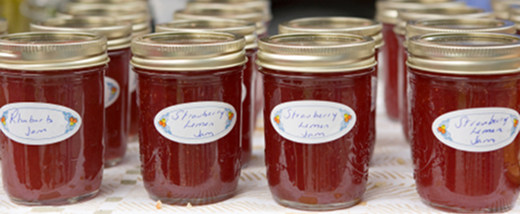
Draeger's Supermarket Jam Experiment

There’s a way for you to increase your online sales by 1,000%. And don’t worry, you won’t have to do anything shady or participate in any shenanigans.

When most people start selling stuff online, they often create extensive product and service lists. They think having a little something for everyone will help them get more sales.

The problem is, people think “more is better,” but in the real world, long product lists are conversion killers.  And if you want to increase your sales by 1,000%, you must streamline your offerings.

To illustrate, let me share Sheena Iyengar’s famous field test.

Fewer Options, More Sales

Sheena Iyengar, a professor at Columbia University, set up a free tasting booth in Draeger’s supermarket – an up scale grocery store – on two consecutive Saturdays.

On one Saturday, 24 flavors of jam were available, and on the other, 6 were available. Now take a guess. Which display sold more jam?

Given the “more is better” mindset, you’d think the larger display sold more. But as you probably know, that’s not what happened.

When 24 jams were available, 60% of the customers stopped for a taste test and 3% of those bought some. When 6 jams were available, 40% of the customers stopped for a taste test, but 30% bought some.

Huge results. While the larger display attracted more people, the smaller display sold more jam. Ten times more. A 1000% more.

Why Does Limiting Options Increase Sales?

Buying products and services is mentally taxing. In most cases, it’s not a “black and white” answer. You need to understand the available information, evaluate if it is the right fit, compare it to competitors, and then decide whether to buy or not to buy.

When you have an exhaustive product list, your prospects will have to go through the above decision-making process for each item on the list.

That’s a ton of work!

And it also leads to what social psychologists call choice overload. To summarize, when people are confronted with several options, they often pick none of them and move on to something else.

This was evident in Sheena’s experiment. When 24 flavors of jam were available, 97% of people chose none, whereas when there were 6 available, 30% bought at least 1.

But the question remains…

How Many Options Should You Offer Online?

Fewer options means more sales in a supermarket. But how does this work online? Is there a “magic number” of options that give you maximum results?

While this varies between businesses, in my experience and research, the magic number falls between 1 and 6. Let me explain.

Online Retailers (Customers Often Browse)

If you’re an online retailer, you should aim between 4 and 6 options.

People who shop retail tend to browse, so showing off more options allows you to capture their attention without giving them choice overload.

For example, Amazon, who is known for their rigorous sales testing, shows up to a maximum of 6 books in their “customers who bought this also bought section.”

Note, actual number depends on the width of your browser.

While I don’t have specific sales results, it’s safe to assume this works. Customers who buy jam are similar to those who buy books. They browse before they purchase. And considering it’s Amazon, I’m sure they tested it.

Software as a Service Providers (Customers Need Service)

If you’re selling software as a service, as in, you require a monthly fee in exchange for using your software, the magic number seems to fall between 4 and 5.

In general, when people need service, they don’t want more or less then they need. On one hand, you need to satisfy your light users, and on the other, you want to satisfy your heavy users. But in both cases, you don’t want either group to feel like they’re getting more than they need because they may cancel the service.

For example, fire up 37signals.com, which is another company that is known for its testing. They offer between 4 and 5 plans for each software service. Is it a coincidence? Probably not. Even Netflix offers between 4 and 5 levels of service.

Information Product Sellers (Customers Need Advice)

If you’re an information product seller, you should focus on one product at a time. That’s how all the big info marketers do it.

The reasoning is simple. People want to buy information from people who are experts. So, if you split up your focus, people may doubt your ability to teach them.

What if you have information in different niches? For starters, many of the top info marketers use stage names in different niches. For example, Eben Pagan uses his name in info marketing, but David DeAngelo in his dating products.

You may doubt the authenticity of this type of marketing. But the key takeaway is that you need to make sure you stand for the one thing you’re currently trying to sell. And if you’re offering various types of services, you should consider giving each of them a different home on the web.

The Bottom Line

Now I’m not telling you to eliminate products. Instead, I’m showing you how streamlining your offerings could potentially increase your sales drastically.

How do you streamline? You could create specific, specialized categories. For example, if you’re a web designer, you could offer three different options:

First, you can offer the “getting started online” package, which helps people get a domain, get hosting, and a specialized web design.

Second, you could offer “remodeling your online presence” which helps people with branding and logo design.

And Third, you could offer a “custom option” which is as per the client’s request.

What do you think? Have you had any success streamlining your products to increase your sales? Leave something in the comments.

And don’t forget.

If you want me to distill psychological research and real-life case studies into nuggets of information that you can apply to your online business, subscribe to my RSS feed or enter your e-mail in the section labeled “Free Updates” on my sidebar.

Related posts:

  1. Are These “Best Practices” Killing Your Online Sales?
  2. Why Social Triggers Will Help You Get Traffic And Increase Sales
  3. How to Use Contrast to Get More Subscribers and Sales

Ce que vous pouvez faire à partir de cette page :

Posted via email from Fabrice Caduc